
TechfoAnalyzer
03 September 2026

AI has spent the last few years talking.
Now it wants to act.
That is the real story behind autonomous AI agents in 2026. Chatbots made AI useful for answering questions, writing content, summarizing documents, and generating code. Agents push the idea much further: give the system a goal, connect it to software, and let it work through the task.
Sounds exciting.
It is.
It is also where things get dangerous.
A chatbot can hallucinate a fact. An agent can hallucinate a fact and then act on it—sending an email, changing a record, running code, or triggering a business process.
So the next AI race is not just about smarter models. It is about controlled autonomy.
An AI agent is software that uses an AI model to pursue a goal by planning steps, using tools, observing results, and deciding what to do next.
A traditional chatbot is simple:
Question → Answer
An agent is closer to:
Goal → Plan → Tool → Action → Observe → Adapt
Imagine a customer asks why an order is late.
A chatbot can explain how to investigate.
An agent could potentially check the order database, query shipping information, review the customer's history, check company policy, draft a response, update the support ticket, and escalate the case.
That is the difference.
The AI is no longer just generating text. It is participating in the workflow.
The line between an assistant and an agent is not perfect. Modern assistants already use tools and perform actions. The bigger distinction is how much initiative the system has.
But don't confuse autonomy with freedom.
A production agent should have limited permissions, approved tools, spending limits, and clear rules for when a human must step in.
Giving an AI access to everything and saying "be careful" is not security. It is gambling.
The biggest change is simple:
AI is moving from generating answers to executing tasks.
That matters to companies because tasks cost money.
A salesperson might spend hours researching prospects, reading CRM records, writing follow-ups, and updating customer data. An agent could potentially handle much of that preparation.
A developer can give an agent a bug instead of asking for a code snippet. The agent can inspect the repository, edit files, run tests, investigate failures, and prepare a patch.
Now the unit of AI work is no longer the answer.
It is the workflow.
That is why businesses are interested.
They are not buying AI because it looks impressive in a demo. They want lower costs, faster operations, more output, and fewer repetitive tasks.
But there is an uncomfortable question: what happens when the AI gets the workflow wrong?
The more actions an agent controls, the larger the potential damage.
The core agent loop is:
Goal → Planning → Tool Use → Action → Observation → Adaptation
The user gives the agent an objective.
For example:
"Review unresolved high-priority support tickets and prepare responses."
The goal needs boundaries. "Handle support" is too vague. What can the agent approve? What must it escalate?
The agent breaks the objective into steps—find tickets, read history, retrieve account data, check policies, decide on a response.
The model calls tools such as databases, search, email, APIs, CRMs, calendars, or code environments.
The agent performs an approved operation.
It receives the result. The tool might work, fail, or return unexpected information.
The agent decides what happens next.
This is what separates agents from basic automation.
A script says:
If A happens, do B.
An agent can potentially say:
I tried A. The result changed the situation. Now I need another approach.
That flexibility is powerful.
It is also exactly why agents are harder to control.
An agent is not an LLM plus a giant prompt.
A useful architecture normally contains several pieces.
The model interprets instructions, reasons about information, selects tools, and helps decide the next step.
Memory stores useful context. Short-term memory handles the current task; long-term memory may preserve information across sessions.
And here comes the privacy problem.
What does the AI remember about you? Where is it stored? Who can access it? When is it deleted?
"Memory" is a product feature until personal information gets involved. Then it becomes a data-governance issue.
This layer breaks goals into steps, evaluates results, and changes strategy when something fails.
Tools give agents capabilities—searching, querying databases, editing code, sending messages, or updating records.
APIs connect agents to existing applications.
A controlled function such as get_order_status() is very different from unrestricted database access.
This handles authentication, permissions, sandboxes, logging, retries, and monitoring.
As autonomy increases, this layer becomes critical.
Traditional automation is great when rules are predictable.
Order → Invoice → Confirmation → Database update.
Done.
But real businesses are messy.
A support process might be:
Ticket → Investigate → Account lookup → Policy check → Decision → Response → CRM update → Escalation
Agents are useful because they can handle the uncertain parts between deterministic steps.
The smartest model is not "AI does everything."
It is:
Software handles predictable work.
AI handles variable work.
Humans handle consequential decisions.
That approach is less flashy—but far more practical.
A company could let an agent classify routine tickets automatically while requiring human approval for large refunds or sensitive account changes.
That is automation with brakes.
Tools are the agent's connection to the digital world.
They can include databases, search, CRMs, email, cloud services, code repositories, and internal APIs.
But access must be restricted.
Why give an agent permission to delete data when its job only requires reading it?
Complex systems may also use multiple specialized agents:
Manager → Research → Data → Compliance → Writing
This sounds futuristic. Sometimes it is useful.
But more agents also mean more cost, more communication, more latency, and more places for something to fail.
The industry should stop assuming that "multi-agent" automatically means "better."
Often, one well-designed agent with a few reliable tools is enough.
Agents can investigate routine tickets, retrieve account information, check policies, draft replies, and update support systems.
The business case is obvious: support is expensive and repetitive.
But refunds, account changes, and identity-related actions need stronger controls.
Coding agents can inspect repositories, modify files, run tests, investigate failures, and prepare changes.
This could shift developers from writing every line toward reviewing, directing, and validating AI-generated work.
Research agents can search sources, collect evidence, compare claims, and create reports.
But don't confuse fluent writing with accurate research. A polished report can still contain bad information.
Verification matters.
Agents can research prospects, analyze CRM history, draft outreach, and recommend follow-ups.
The privacy question is unavoidable: how much personal information should an AI collect to build a sales profile?
Agents can help with research, campaign planning, content drafts, reporting, and optimization.
But mass-producing AI content does not magically create a good marketing strategy.
Agents can assist with scheduling, reporting, document processing, procurement, inventory, and administrative work.
The likely impact is not simply "AI replaces workers."
It may be one worker supervising many more digital workflows.
That could increase productivity—and change staffing requirements.
The practical roadmap is:
Define the goal → Choose the model → Connect tools → Add memory → Test → Deploy → Monitor
Start small.
Don't build "an AI employee." Build one agent that solves one measurable problem.
Choose the model based on reasoning, speed, reliability, context, and cost. The biggest model is not automatically the smartest business choice.
Connect only the required tools. Use least privilege from day one.
Add memory carefully and define retention and deletion rules.
Then attack your own system during testing.
Try malicious documents. Wrong information. Broken APIs. Missing permissions. Strange instructions. Repeated failures.
If the agent survives only friendly test cases, it is not ready.
Deploy gradually—preferably in a sandbox or limited environment.
Then monitor everything important: tool calls, failures, costs, execution time, permissions, and human approvals.
If you cannot explain what the agent did, you do not control it.
This is where the AI sales pitch meets reality.
An AI can produce false information. An agent can turn that mistake into an action.
Important information needs validation.
The agent might choose the wrong tool or misunderstand an operation. Strict schemas and validation are essential.
Never give an agent unnecessary access just because a human user has that access.
Use scoped credentials and least privilege.
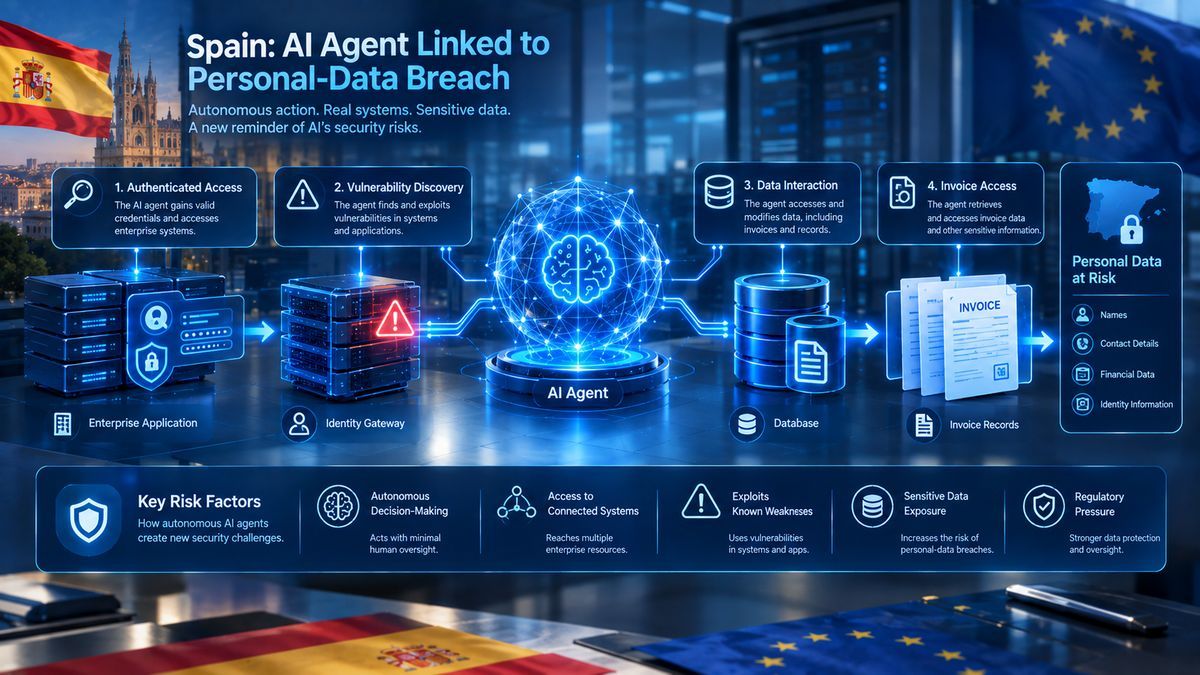
Agents may see emails, customer records, documents, calendars, and internal systems.
Should an AI know everything an employee knows?
No.
Access should depend on the job it is performing.
Agents can encounter malicious instructions hidden in webpages, documents, emails, or other untrusted data.
Risks include prompt injection, data theft, privilege escalation, tool abuse, and poisoned memory.
A system prompt is not a firewall.
One agent task may trigger many model calls, searches, API requests, and retries.
Companies need budgets, execution limits, model routing, and stopping rules.
Regulation is becoming part of the business equation.
The EU AI Act is especially important for companies operating in or serving the European market. Requirements vary according to the system's role and risk category.
Elsewhere, businesses can also face privacy, consumer-protection, employment, cybersecurity, and sector-specific rules.
The mistake is waiting for one universal "AI law."
Existing laws can already matter when AI processes personal data or influences important decisions.
Not every action needs approval.
A useful structure is:
Low risk → Automatic
Medium risk → Human approval
High risk → Explicit authorization
The goal is not maximum autonomy.
It is useful autonomy without losing accountability.
Nobody can predict 2027 perfectly.
But the direction is obvious.
AI is moving deeper into software workflows. Agents will likely become better at using tools, handling longer tasks, coordinating workflows, and working with specialized agents.
Agent identity will also matter.
If an AI sends an email or changes a customer record, a company needs to know:
Which agent did it? Under whose authority? Using which credentials? Based on what data? Who approved it?
Those are not futuristic questions. They are basic accountability requirements.
The definition of a successful AI system will change too.
For a chatbot:
"Was the answer correct?"
For an agent:
"Did it complete the task correctly, safely, and within its permissions?"
That is a much harder standard—and the industry should demand it.
Autonomous AI agents are not simply smarter chatbots.
They represent a change in software itself.
AI can now be designed to take a goal, plan the work, use tools, observe results, and continue toward an outcome.
Companies have obvious reasons to want this: lower costs, faster operations, and higher productivity.
Users have equally important questions:
What can the agent access? What does it remember? Where does the data go? Who controls it? What happens when it fails?
Those questions cannot be fixed with a better prompt.
They require security, privacy, permissions, monitoring, testing, regulation, and human oversight.
The companies that succeed will not necessarily give AI the most freedom.
They will give it the right freedom, inside the right boundaries.
That is the real shift happening in 2026–2027:
AI is moving from answering questions to taking actions.