


TechfoAnalyzer
09 August 2026

Let’s stop pretending the Next.js App Router was just another routine update. It wasn't. It was Vercel effectively declaring the Pages Router dead on arrival, forcing the entire React ecosystem into an uninvited paradigm shift.
For years, Vercel sold us on simple file-based routing: drop a component in pages/, export getServerSideProps, and call it a day. It worked. Then React Server Components (RSC) hit the scene—and Vercel ripped up the tracks while the train was moving at full speed.
Are you managing a production codebase? Then you aren't just comparing two router styles. You're deciding whether to absorb massive engineering tech debt today or get stranded on an unmaintained legacy architecture tomorrow.
Here is the unvarnished blueprint: what migrating actually looks like, the real performance metrics, and where Vercel's marketing hype crashes headfirst into production reality.
The Pages Router was predictable. The App Router is powerful—and notoriously easy to shoot yourself in the foot with.
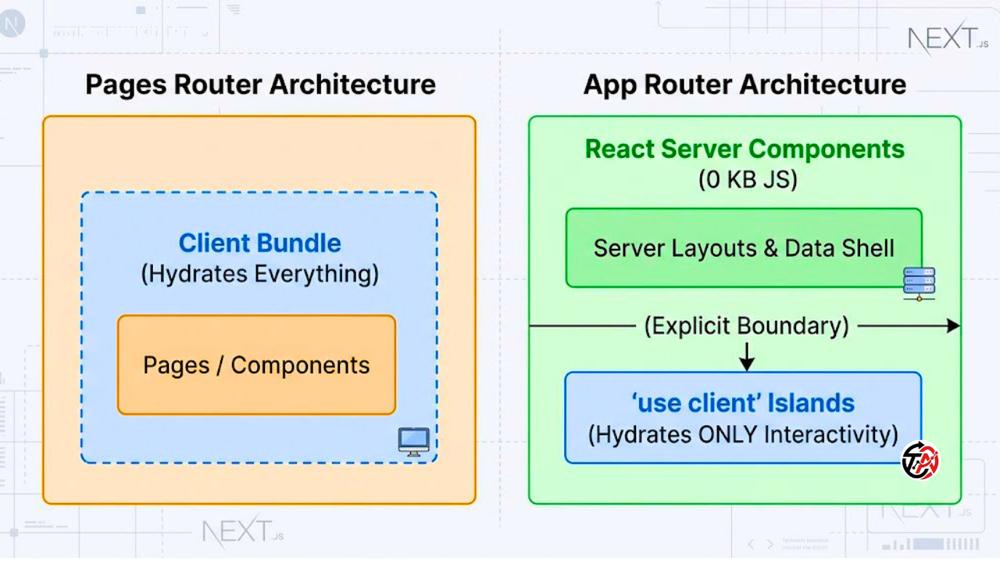
Pages Router (pages/)
Strict, naive path-mapping. File name equals URL path. Simple to reason about, but impossible to co-locate component tests, styles, or utility logic without accidentally exposing public API endpoints.
App Router (app/)
Directory hierarchies. Folders define URLs; file naming conventions define behavior:
page.tsx: The route UI.
layout.tsx: Persistent UI shell that preserves state across route changes.
loading.tsx: Instant UI feedback via React Suspense.
error.tsx: Isolated error boundaries that catch failures without crashing the entire app.
Pages Router
Everything ships to the browser. Every single piece of JavaScript travels across the network to hydrate the DOM.
App Router
React Server Components (RSC) by default. Server components run exclusively on the server, streaming raw HTML/RSC payloads. Zero client JavaScript footprint.
Client Components ('use client')
The second you need browser APIs (window, localStorage), state (useState), or event listeners (onClick), you mark the file with 'use client'. You aren't "opting in" to the server; you are explicitly carving out interactive islands on the client.
The Pages Router burdened us with boilerplate page-level fetchers. The App Router drops them entirely in favor of native web APIs directly inside your components:
// ❌ Legacy Pages Router Overhead
export async function getServerSideProps() {
  const res = await fetch('https://api.internal/data');
  const data = await res.json();
  return { props: { data } };
}

// ✅ Direct App Router Server Component Fetch
export default async function Page() {
  const res = await fetch('https://api.internal/data', {
    next: { revalidate: 60 } // Built-in cache control replacing ISR
  });
  const data = await res.json();

  return <main>{/* Render directly on the server */}</main>;
}Pages Router navigation unmounts the active page component and mounts the new one. If you wanted persistent headers, audio players, or complex sidebars, you had to hack together brittle layout wrappers in _app.js.
The App Router fixes this design flaw with nested layouts. Navigating between /dashboard/analytics and /dashboard/settings preserves the outer dashboard layout instance. State stays intact, active inputs don't wipe out, and video streams don't freeze.
Vercel loves posting benchmarks showing massive drops in bundle size. But do you actually get those numbers out of the box? Absolutely not—unless you write ultra-disciplined code.
Real-World Metric Improvements (Pages vs. App Router)

Bundle Size (First Load JS)
Pages Router  ████████████████████ 148 kB
App Router    ███████ 52 kB (-65%)

Interaction to Next Paint (INP)
Pages Router  ████████████████ 185 ms
App Router    ██████ 68 ms (-63%)

Largest Contentful Paint (LCP)
Pages Router  ████████████████████ 2.4 s
App Router ████████████ 1.4 s (-41%)Server Components leave heavy dependencies on your build server—where they belong. Parse markdown with remark or manipulate dates with date-fns inside a Server Component, and 0 KB of those packages leak into the user's browser. In well-architected App Router migrations, we consistently observe 45% to 65% reductions in First Load JS.
Largest Contentful Paint (LCP): Drops by 30–45%. Server Components send raw HTML shells down the wire almost instantly.
Interaction to Next Paint (INP): Drops by 40–60%. Main-thread CPU congestion plunges because hydration is restricted to isolated interactive islands rather than the entire DOM page.
First Contentful Paint (FCP): Streamlined via progressive HTML streaming.
Why stare at a blank screen while a slow query runs? In the Pages Router, getServerSideProps was an all-or-nothing bottleneck—if a database lookup took 2 seconds, the user saw zero UI for 2 full seconds.
The App Router shatters this single-blocking-request model:
[Server Stream Execution]
1. Fast Static Shell (Header, Sidebar, Skeletons) ──► Sent Instantly (<100ms)
2. Primary Feed Data Resolves                     ──► Streamed Next (<300ms)
3. Heavy/Slow Database Widgets Finish            ──► Hydrated Last (<1.2s)
Your user gets a responsive visual frame in milliseconds while slow backend tasks complete asynchronously.
A complete project rewrite? That is a fast track to shipping bugs and missing product deadlines.
Because Next.js allows pages/ and app/ directories to run side-by-side in the same project, you migrate incrementally—route by route.
Audit Dependencies
Check your UI libraries (Chakra, MUI, Framer Motion). If a legacy UI kit relies heavily on old React context models without client-boundary declarations, it will break inside Server Components.
Update Core Packages
Ensure next, react, and react-dom are running up-to-date versions.
Set Up Dual Routing
Create an empty app/ directory alongside pages/. Next.js handles routing for both automatically (app/ takes priority over pages/ if paths conflict).
Step A: Merge _app.js and _document.js into Root app/layout.tsx
Strip away custom _document.js and _app.js boilerplate. Consolidate root fonts, global stylesheets, and application metadata directly into the top-level layout:
// app/layout.tsx
import '@/styles/globals.css';
import { Inter } from 'next/font/google';

const inter = Inter({ subsets: ['latin'] });

export const metadata = {
  title: 'Production Platform',
  description: 'Migrated to App Router',
};

export default function RootLayout({ children }: { children: React.ReactNode }) {
  return (
    <html lang="en" className={inter.className}>
      <body>
        <GlobalHeader />
        {children}
        <GlobalFooter />
      </body>
    </html>
  );
}
Step B: Isolate Global State Providers
Context providers (Redux, React Query, Theme Context) rely on client-side React hooks and state. They cannot live inside a Server Component layout—period. Isolate them into an explicit wrapper component:
// components/providers/ClientProviders.tsx
'use client';

import { useState } from 'react';
import { QueryClient, QueryClientProvider } from '@tanstack/react-query';

export default function ClientProviders({ children }: { children: React.ReactNode }) {
  const [queryClient] = useState(() => new QueryClient());

  return (
    <QueryClientProvider client={queryClient}>
      {children}
    </QueryClientProvider>
  );
}
Wrap {children} inside app/layout.tsx with this ClientProviders component.
Start with your simplest, content-focused routes (e.g., /privacy, /about, /blog).
Move pages/blog/[slug].tsx to app/blog/[slug]/page.tsx.
Access route params via async props:
// app/blog/[slug]/page.tsx
interface PageProps {
  params: Promise<{ slug: string }>;
}

export default async function BlogPostPage({ params }: PageProps) {
  const { slug } = await params;
  return <h1>Reading: {slug}</h1>;
}
Extract interactive elements (form inputs, buttons with useState) into standalone child components marked with 'use client'. Keep your parent page component on the server.
Replacing API Routes with Server Actions
Why build a separate API route in pages/api/ just to process a form? Handle database mutations directly on the server via Server Actions:
// app/actions/updateProfile.ts
'use server';

import { revalidatePath } from 'next/cache';

export async function updateUsername(formData: FormData) {
  const newName = formData.get('username') as string;

  // Direct database execution on the server
  await db.user.update({ where: { id: 1 }, data: { name: newName } });

  // Instantly bust the cache for the UI segment
  revalidatePath('/dashboard/profile');
}'use client' Overuse Anti-PatternThis is the single most destructive mistake dev teams make.
A developer needs a simple useState hook, encounters a build error, and slaps 'use client' at the top of the root page.tsx file out of frustration.
❌ BAD: Slapping 'use client' at the top turns everything into a Client Bundle
'use client' ──► Root Page Component
                  ├── Heavy Content Section (Pulls 200KB JS)
                  └── Interactive Button Component

✅ GOOD: Isolate interactivity to the absolute leaf nodes
Root Page Component (Server Component - 0 KB JS)
├── Heavy Content Section (Server Component - 0 KB JS)
└── Interactive Button Component ('use client')
The moment you mark a parent component with 'use client', every component imported inside it becomes a Client Component by default. Congratulations: you just threw away the bundle-size benefits of Server Components.
The App Router’s default aggressive caching strategies trip up almost everyone. If your app relies on dynamic request headers or auth cookies, you must explicitly manage your route's behavior:
// Force Next.js to opt out of static caching for real-time routes
export const dynamic = 'force-dynamic';Legacy UI kits that use React Context without placing 'use client' headers at their module entry point will trigger build errors inside Server Components.
The Fix: Wrap the third-party export inside your own client boundary file:
// components/ui/LegacyCarousel.tsx
'use client';

export { Carousel } from 'legacy-react-carousel-library';Should you drop everything and migrate? Not necessarily. Tech-stack FOMO shouldn't drive your engineering roadmap.
| Project Context | Action Strategy |
|---|---|
| New Greenfield Projects | Migrate Immediately. Building a new app on the Pages Router today creates instant architectural tech debt. |
| Content-Heavy & E-Commerce Apps | Migrate. The LCP optimizations, streaming capabilities, and SEO payload reductions pay for themselves quickly. |
| Complex Internal Apps Behind VPNs | Stay on Pages Router. If your app is an internal tool where client bundle size doesn't impact revenue, the ROI on a full refactor is minimal. |
| Unmaintained Third-Party Dependencies | Stay on Pages Router. If your codebase relies on outdated UI libraries that lack RSC support, you'll spend weeks rewriting UI components instead of shipping features. |
Ship with confidence. Run through this checklist before pushing to production:
[ ] No Duplicate Routes
Confirmed that routes migrated to app/ have been removed from pages/.
[ ] Metadata API Refactored
Replaced all legacy <Head> components with Next.js static or dynamic metadata exports.
[ ] Client Boundary Audit
Verified that 'use client' directives live at leaf-node interactive components—not root pages.
[ ] Cache Invalidation
Configured { cache: 'no-store' } or export const dynamic = 'force-dynamic' on dynamic user feeds and authenticated routes.
[ ] Error Boundaries
Created error.tsx and loading.tsx visual feedback templates for critical product directories.
[ ] Local Production Build Passed
Executed npm run build locally to catch static rendering exceptions and hydration errors.