

TechfoAnalyzer
11 August 2026
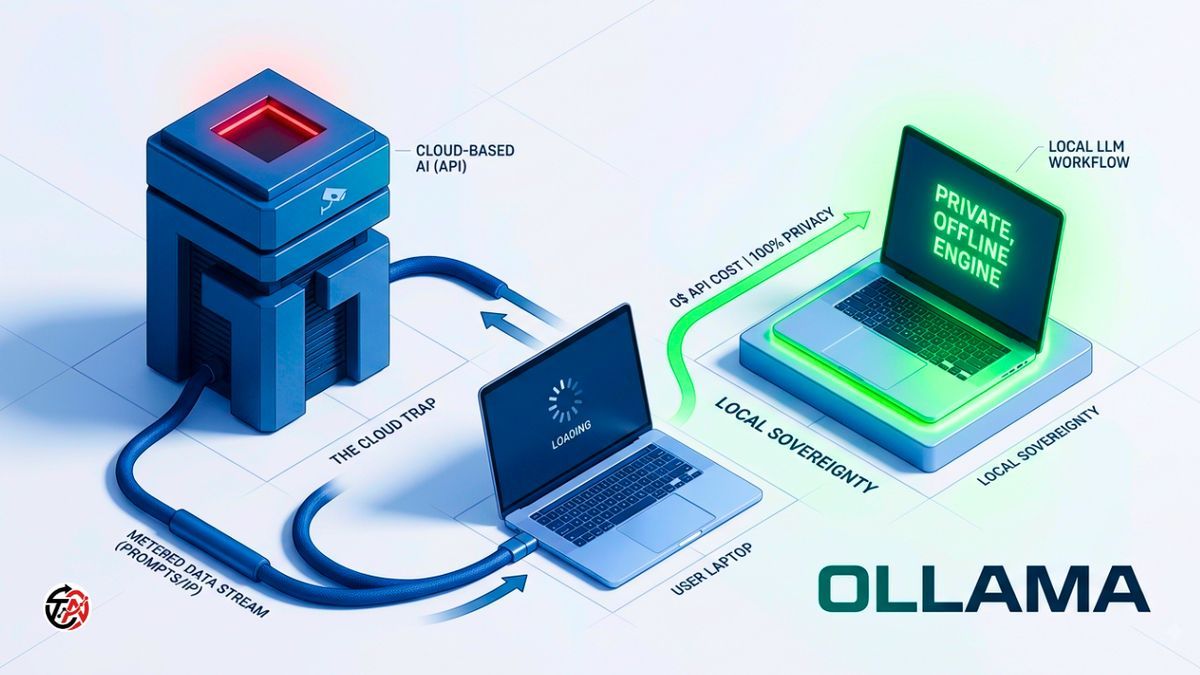
Every time you type a prompt into ChatGPT, Claude, or Gemini, you are participating in a quiet corporate compromise. You hand over your unencrypted thoughts, business strategy, and proprietary code to a remote server cluster—and you pay $20 a month for the privilege of letting mega-corporations index your data.
Cloud AI is a surveillance model disguised as productivity. Big Tech wants you hooked on metered APIs and monthly subscriptions so they retain total ownership over the infrastructure, your workflow, and your data footprint.
Running Local Large Language Models (LLMs) breaks this dynamic completely. By executing neural networks directly on your consumer hardware, you get absolute privacy, zero latency dependency, zero API metering, and immune status against corporate censorship or sudden policy shifts.
Ollama is the engine that made this transition effortless. It strips away the complex execution flags, Python environment hell, and driver management nightmares of early local AI, turning open-weight execution into a single terminal command. Here is the definitive, no-nonsense setup guide.
Big Tech sells cloud AI on convenience, but the hidden costs—data harvesting, surprise rate limits, and constant platform shifting—are unsustainable for serious developers and privacy-conscious users.

Ollama stands out over raw execution backends like llama.cpp because it acts as an intelligent orchestration layer:
Background Daemon
Runs as an efficient, low-footprint service.
Auto-Hardware Detection
Detects CUDA, ROCm, or Apple Silicon Metal layers automatically and offloads model tensors to your GPU without manual flag tuning.
Native Local REST API
Spins up a production-ready endpoint on localhost:11434 instantly, allowing local developer tools and UIs to bridge directly into the model.
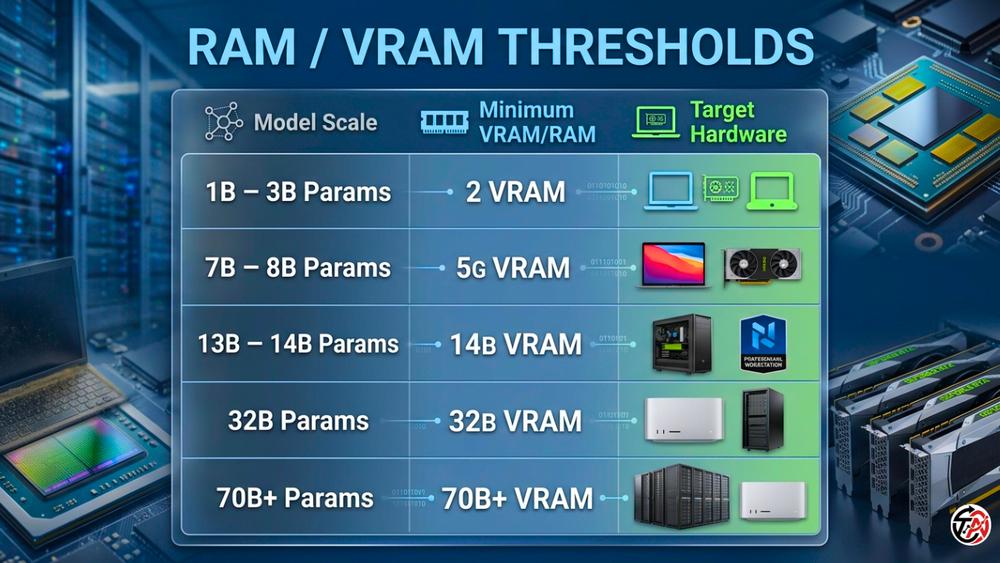
Let's cut through the marketing noise: AI models don't care about your CPU clock speed nearly as much as they care about memory bandwidth and VRAM volume.
Apple Silicon (M1/M2/M3/M4)
Apple’s Unified Memory Architecture (UMA) is the undisputed king of local LLM cost-efficiency. Because the CPU and GPU share one massive, high-bandwidth memory bus, a 36GB or 64GB MacBook Pro can run a 32B parameter model entirely in unified memory—a task that would otherwise require $2,000+ in dedicated enterprise PC graphics cards.
NVIDIA / AMD GPUs
Standard PCs rely on VRAM. If a model fits entirely within your GPU's VRAM (e.g., an 8B model inside an 8GB RTX 4060), execution speed is blazing fast (50–120+ tokens per second).
CPU Fallback
If your model overflows your VRAM into system DDR4/DDR5 RAM, execution slows down drastically. It remains functional, but expect conversational speeds (2–8 tokens per second) rather than instant responses.
Getting Ollama onto your machine takes under two minutes.
Download the archive directly from
Unzip and drag Ollama.app into your /Applications directory.
Launch the app once to let it automatically set up symlinks and binary paths.
Download the executable installer from
Run OllamaSetup.exe.
The background service will spin up in your system tray automatically.
Skip graphical installers entirely. Run the official installation script in your shell:
#Bash
curl -fsSL https://ollama.com/install.sh | shVerify that the CLI is active and ready:
#Bash
ollama --versionBrowse the registry at
Llama 3.3 / 3.1
Meta's heavy hitters. Outstanding general reasoning and instruction following.
DeepSeek-R1
Specialized reasoning architectures that print their internal chain-of-thought processing before outputting an answer.
Qwen 2.5 / Qwen 2.5-Coder
Alibaba's open models—currently setting the benchmark for coding, math, and structured data execution.
Mistral / Gemma
Lightweight workhorses tailored for constrained memory limits.
q4_k_m Is the Sweet SpotRaw model weights ship as 16-bit floating point values (FP16). An uncompressed 8B model demands over 16GB of VRAM—unusable for standard laptops.
Quantization squashes these weights into 4-bit or 8-bit integers.
q4_k_m (4-bit Medium) slashes memory consumption by ~75% while keeping nearly 98% of the baseline model's logical intelligence. It's Ollama's default for a reason. Unless you have enterprise VRAM to burn on q8_0, stick to 4-bit quantization.
Pull and spin up a model with a single command:
#Bash
ollama run llama3.2Ollama fetches the compressed GGUF file, maps the neural layers into your VRAM, and boots an interactive shell:
User Input:
Analyze the primary business risk of relying on third-party cloud AI APIs.
Ollama Output:
The primary risk is platform lock-in combined with operational fragility. When your product relies on a third-party API, you expose your business to unannounced price hikes, sudden policy changes, model deprecations, and uncontrolled data exposure—effectively surrendering your core technology stack to an external vendor's bottom line.
Type /bye to exit.
Keep your system lean with these direct terminal controls:
View downloaded models
#Bash
ollama list
Check currently active models in VRAM
#Bash
ollama psFetch a model without opening a chat session
#Bash
ollama pull qwen2.5-coder:7bInstantly purge a model from RAM
#Bash
ollama stop llama3.2Delete model files to free disk space
#Bash
ollama rm llama3.2Terminal windows work for quick tests. Long analytical sessions require rich text rendering, persistent chat histories, and file uploads.
Open WebUI duplicates the full ChatGPT layout locally—without tracking user data.
Deploy instantly via Docker:
#Bash
docker run -d -p 3000:8080 --add-host=host.docker.internal:host-gateway \
  -v open-webui:/app/backend/data \
  --name open-webui \
  --restart always \
  ghcr.io/open-webui/open-webui:main
Navigate to http://localhost:3000. It bridges directly to your running Ollama instance on port 11434.
AnythingLLM
A standalone installer featuring built-in document ingestion and offline Retrieval-Augmented Generation (RAG).
Page Assist
A browser extension that embeds a local AI side-panel straight into Chrome or Firefox.
Stop settling for generic assistant personalities. You can hardcode explicit system instructions, tune temperature parameters, and lock down output rules by writing a Modelfile.
ModelfileSave a text file named Modelfile:
#Dockerfile
FROM llama3.2

# Enforce strict, low-creativity outputs
PARAMETER temperature 0.2

# Enforce system personality rules
SYSTEM """
You are an uncompromising technical editor.
Critique code and architecture proposals ruthlessly.
Never use fluff, conversational pleasantries, or apologetic language.
Deliver direct, actionable, and punchy critiques immediately.
"""#Bash
ollama create ruthless-editor -f Modelfile#Bash
ollama run ruthless-editorOllama doesn't lock your engine inside an isolated shell—it exposes a standardized REST endpoint ready for your custom code.
Query your engine directly using curl:
#Bash
curl http://localhost:11434/api/generate -d '{
  "model": "llama3.2",
  "prompt": "List three security vulnerabilities of unvetted NPM packages.",
  "stream": false
}'Ditch telemetry-heavy cloud coding assistants. Install the Continue.dev extension in VS Code and point your ~/.continue/config.json directly to your local engine:
#JSON
{
  "models": [
    {
      "title": "Local Qwen Coder",
      "provider": "ollama",
      "model": "qwen2.5-coder:7b"
    }
  ]
}Build offline knowledge-retrieval applications without paying per-token API fees:
#Python
from langchain_community.llms import Ollama

# Bind directly to your background daemon
llm = Ollama(model="qwen2.5")

# Execute locally
response = llm.invoke("Summarize the risks of corporate vendor lock-in.")
print(response)Hanging system? Model generation crawling? Here is how to fix it:
Out-of-Memory Crashing
Run ollama ps to inspect active VRAM consumption. Force-unload heavy models with ollama stop <model_name>, then downgrade to a smaller parameter size or a higher quantization tier (e.g., switch from 14B down to 8B).
Slow Response Speeds
Check your GPU drivers (NVIDIA CUDA or AMD ROCm). If your drivers are misconfigured, Ollama silently falls back to multi-threaded CPU processing.
Storage Bloat
Model weights accumulate rapidly. Audit your local cache with ollama list and purge unused models via ollama rm <model_name>.
Ownership over your computing environment isn't just an ideological preference—it's a massive tactical edge. Running local LLMs through Ollama eliminates SaaS overhead, locks down your IP, and guarantees access when cloud networks fail.
Stop renting access to corporate AI. Download Ollama, pull an open-weight model, and run your software stack on your own terms.